Fill your knowledge base: documents your agent answers from
Upload PDFs, Word and text files – your agent reads them automatically and answers questions about them. Multiple documents allowed, up to 10 MB per file.
In the app: AI Telephony → Agents → [Agent] → Knowledge Base
Price list, FAQ, opening hours, service descriptions – upload everything your agent should know about your business as a document. The agent reads the files automatically and uses them to answer callers' questions. No rewriting, no manual data entry: whatever you already have as a PDF or Word file becomes the basis for its answers.
How to set it up
- Open your agent and go to the Knowledge Base (“Wissens-Datenbank”) tab.
- Click Choose file (“Datei auswählen”) – supported formats are PDF, DOCX and TXT, up to 10 MB per file.
- Click Upload (“Hochladen”). The document appears in the list and is available to the agent right away.
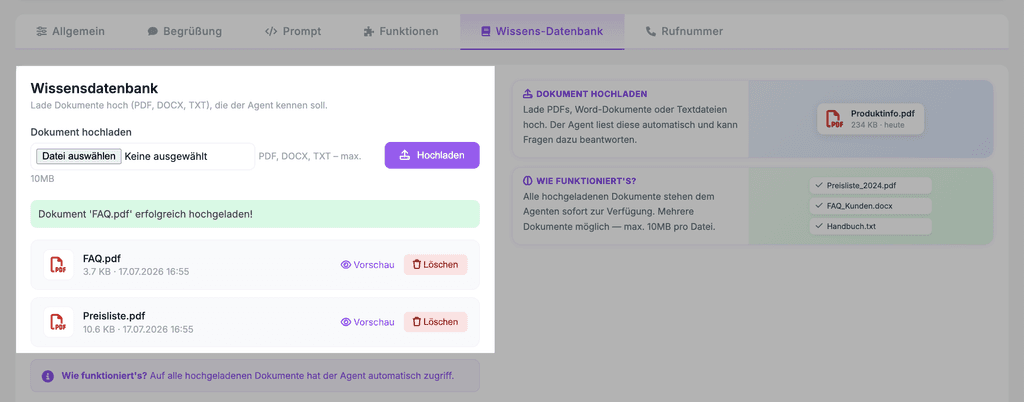
- Add more documents as needed – you can upload multiple files.
- In the Functions (“Funktionen”) tab, make sure General information (“Allgemeine Auskunft”) is turned on – this function answers questions based on your knowledge base.
Real-world example
A plumbing company uploads three files: Preisliste_2026.pdf, FAQ_Notdienst.docx and its service area zones as a text file. From then on, the agent answers questions about costs, service area and emergency service hours on its own – and only callers who actually need an appointment or emergency service reach the team.
Where: AI Telephony (“KI-Telefonie”) → Agents (“Agenten”) → choose an agent → Knowledge Base tab
Good to know
- Good candidates for your knowledge base: price lists, frequently asked questions, opening hours and directions, service and product descriptions, cancellation and delivery terms.
- Several topic-specific files beat one giant document – clearly separated topics (prices, FAQ, directions) help the agent find the right answer and make updates easier for you.
- Keep it current: When prices or hours change, swap out the document in the agent too – the agent only knows what you give it.
- Text-based files work most reliably – a PDF created from text is easier to read than a scanned one.
- The knowledge base supplies the facts; how the agent sounds and behaves is controlled separately in the system prompt.
Last updated July 16, 2026
Related
- Analyze Frequent Call Reasons: Know Why Your Phone RingsCallana automatically categorizes every call by reason. How to read the list – and turn the numbers into concrete improvements.
- Shape how your agent behaves: the system promptThe prompt defines your agent's personality, language and limits. With tips on structure and a template you can adapt.
- Assign functions: decide what your agent can doSix functions, one checkbox each: decide per agent what it should handle – from requests and call transfers to address book transfers.
