Phone Number & Multi-Agent: Who Answers the Call?
Every agent needs a phone number – and several agents can share one. How to use Multi-Agent for testing, seasonal setups and variants.
In the app: AI Telephony → Agents → [Agent] → Phone Number
The phone number is your agent's home: incoming calls to that number are answered by the agent assigned to it and set to active. The interesting part is Multi-Agent – several agents can share the same number, but only one is ever active. That turns seasonal changes, tests and variants into a simple switch instead of a rebuild.
What the tab shows
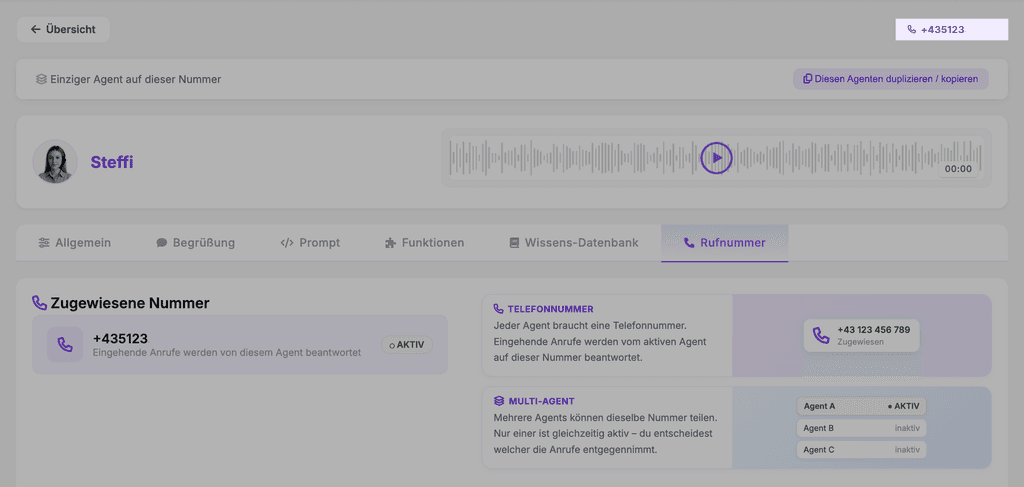
Under Assigned Number (“Zugewiesene Nummer”) you'll see your agent's phone number with a status badge (ACTIVE, “AKTIV”) and the note “Incoming calls are answered by this agent.” If your agent is the only one on the number, the page also shows the banner “Only agent on this number” (“Einziger Agent auf dieser Nummer”) at the top. You can also always find the number in the top right of the agent page header.
Multi-Agent: one number, several agents
Several agents can share the same number – only one is active at a time, and you decide which one takes the calls. The inactive ones stay fully configured, ready when you need them. Typical uses:
- Test variants: Compare two prompts or voices – switch, watch the call list, decide.
- Seasonal agents: A summer agent and a winter agent, each with its own greeting and knowledge base, switched on a set date.
- Special operations: One agent for normal business, another for inventory days, trade shows or emergency operation.
The fastest way to a second variant is the Duplicate / copy this agent button (“Diesen Agenten duplizieren / kopieren”) at the top of the agent page – create a copy, adjust it, and make it active when you need it.
A real-world example
Before the summer season, a hotel duplicates its agent, updates the copy's greeting and knowledge base with seasonal topics (pool hours, late checkout) and switches over on the set date. The number stays the same; guests only notice the fresh content – and in the fall, switching back takes one click.
Where: AI Telephony (“KI-Telefonie”) → Agents (“Agenten”) → select an agent → Phone Number tab (“Rufnummer”)
Good to know
- One agent per number is active – the status badge always shows who's picking up right now.
- Each agent brings its complete personality (voice, greeting, prompt, functions), so switching the active agent swaps everything at once.
- New or additional phone numbers are set up together with the Callana team.
Last updated July 17, 2026
Related
- Set your agent's voice, speaking speed and expressivenessChoose a voice, then fine-tune speed and expressiveness so your agent sounds like your brand. With audio previews right in the dashboard.
- Shape how your agent behaves: the system promptThe prompt defines your agent's personality, language and limits. With tips on structure and a template you can adapt.
- Assign functions: decide what your agent can doSix functions, one checkbox each: decide per agent what it should handle – from requests and call transfers to address book transfers.
