Set your agent's voice, speaking speed and expressiveness
Choose a voice, then fine-tune speed and expressiveness so your agent sounds like your brand. With audio previews right in the dashboard.
In the app: AI Telephony → Agents → [Agent] → General
Your voice is your company's first impression on the phone. In Callana, you don't pick one blindly from a list – you listen to each voice first, then fine-tune speed and expression for your callers: calm and precise for a law firm, warm and lively for a salon.
How to set it up
- Open your agent and stay in the General (“Allgemein”) tab, Voice & Language (“Stimme & Sprache”) section.
- Choose a voice: Open the dropdown and listen to the options using the Play button. There's also a preview player at the top of the agent header, so you can play the current voice anytime.
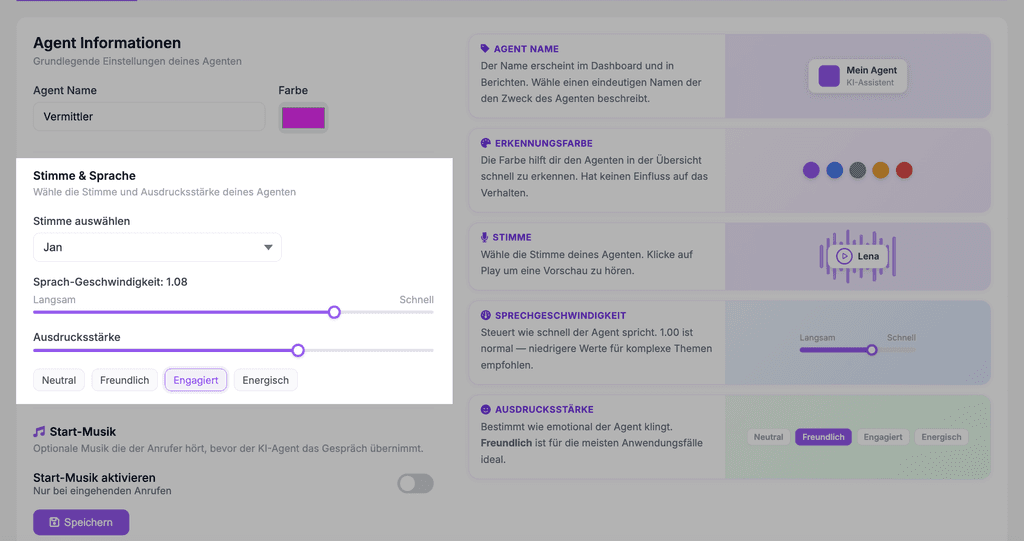
- Speaking speed (“Sprech-Geschwindigkeit”): 1.00 is normal speed. For topics that need a lot of explaining or are complex, a value slightly below works well; for short, snappy announcements it can be a little above (e.g. 1.05).
- Expressiveness (“Ausdrucksstärke”): Choose a preset – Neutral, Friendly, Engaged or Energetic (“Neutral, Freundlich, Engagiert, Energisch”) – or fine-tune with the slider in between. Friendly is the right choice for most use cases.
- Save (“Speichern”) – then comes the most important step: a test call. A voice always sounds a little different on the phone than in the preview.
Real-world example
A tax advisory firm chooses a calm voice, sets the speed to 0.95 – nothing should get lost when it comes to deadlines and technical terms – and keeps expressiveness between Neutral and Friendly. The team compared two favorite voices with test calls; in the end, the deciding factor was which one “sounds like us”.
Where: AI Telephony (“KI-Telefonie”) → Agents (“Agenten”) → choose an agent → General tab, “Voice & Language” section
Good to know
- Per agent, not per account: Each agent has its own voice – a sales agent can sound more energetic than the support agent on the same number.
- The Identification color (“Erkennungsfarbe”) in the same tab is purely visual, to help you keep track in your overview – it has no effect on how the agent behaves.
- Also in the General tab: Intro music (“Start-Musik”) – optional music callers hear before the agent picks up (incoming calls only, turned on with a toggle).
- Speed and expression work together with what the agent says – short sentences in the system prompt often make it sound more natural than any amount of slider tweaking.
Last updated July 16, 2026
Related
- Set up your greeting – in up to six languagesThe first message matters: add a greeting in up to 6 languages, and your agent automatically detects the caller's language. Including the AI disclosure.
- Shape how your agent behaves: the system promptThe prompt defines your agent's personality, language and limits. With tips on structure and a template you can adapt.
- Phone Number & Multi-Agent: Who Answers the Call?Every agent needs a phone number – and several agents can share one. How to use Multi-Agent for testing, seasonal setups and variants.
