Time-based greetings for morning, midday and evening
Greet callers differently in the morning, at midday and in the evening: time windows with weekday settings automatically replace your default greeting.
In the app: AI Telephony → Agents → [Agent] → Greeting
A cheerful “Good morning!” at 8 a.m. lands differently than the same standard message at 10 p.m. With time-based welcome messages, your agent greets callers to match the time of day – automatically, with no switching on your part. If a call falls within a time window you've defined, that window's message replaces the default greeting. Combined with the weekday selection, there's even more to it: a test lab for finding out which greeting works best with your callers.
How to set it up
- Open your agent and go to the Greeting (“Begrüßung”) tab.
- Scroll to the Time-based welcome messages (“Zeitabhängige Willkommensnachrichten”) section and click + Time window (“+ Zeitfenster”).
- Set the times from – to (e.g. 06:00 – 09:30) and write the message for this window, such as: “Good morning! I'm Ana, the AI assistant for …” [Screenshot: time window 06:00–09:30 with a morning greeting and weekday selection]
- Optional: Choose the Weekdays (Mon–Sun) the window should apply to. No selection means the window applies every day.
- Add more windows as needed – say, 17:00 – 23:00 for the evening – and click Save (“Speichern”).
Advanced: A/B test your greetings
The weekday selection turns your time windows into a test matrix: same time window, different weekday, different wording. For example, set up the same daily windows for Monday and Tuesday (06:00–08:59, 09:00–10:59, 11:00–13:59 …), but with different variants – “Good morning, I'm …” on Mondays, “Hi there, this is …” on Tuesdays. Each caller hears exactly one variant, and you collect comparison data without ever switching anything.
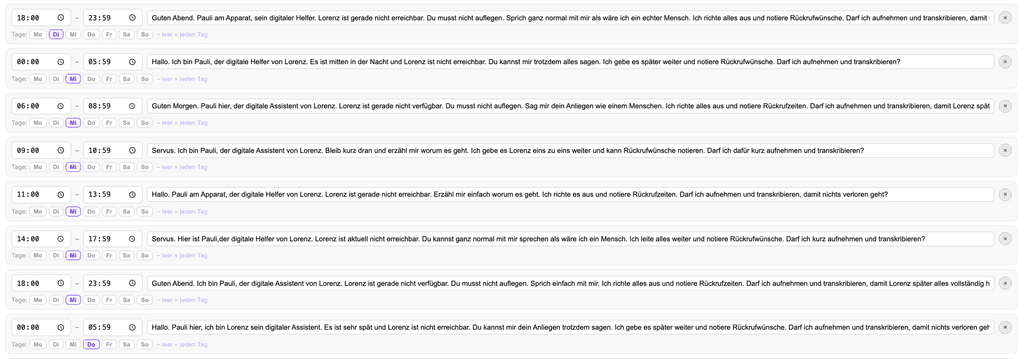
Worth varying: the salutation (Hi / Hello / Good morning), the reassurance (“You don't have to hang up – just talk to me like you would to a person”) and the wording of the recording notice – as a casual announcement or a polite question (“May I record and transcribe this call?”).
You analyze the results by hand, but it's quick: in the Call log (“Anrufe”), compare the abgebrochener_anruf tags and call durations for each weekday; the content search shows how callers respond to specific wording.
Real-world example
A colleague on the Callana team uses his personal agent as an ongoing experiment: the agent picks up whenever he can't, and each weekday has the same daily windows, each with slightly different wording – from the salutation to the recording question. After two weeks, the hang-up patterns and conversation transcripts clearly showed which variants kept callers relaxed and talking – and the winning wording became the new default greeting. Effort: set it up once, then just read the results.
Where: AI Telephony (“KI-Telefonie”) → Agents (“Agenten”) → choose an agent → Greeting tab
Good to know
- Outside all time windows, your default welcome message applies automatically – you don't need to create a “rest of the day” window.
- Test cleanly: Change only one thing per variant if you can. And keep in mind that weekdays differ systematically (Monday callers aren't Saturday callers) – rotating over two or three weeks makes the results reliable.
- EU AI Act / GDPR: Mention in every greeting variant that the call is handled by an AI and recorded – the input field in the Greeting tab reminds you. It's easy to miss when you're testing lots of variants.
- A classic that works well, too: mention same-day openings in the morning and online booking in the evening – and on your day off, the weekday selection simply lets the default greeting take over.
- Vacation periods have their own option: under Business closure (“Betriebsurlaub”), you can set entire date ranges with their own message – and the AI automatically gets the closure context for the conversation.
Last updated July 16, 2026
Related
- Set up your greeting – in up to six languagesThe first message matters: add a greeting in up to 6 languages, and your agent automatically detects the caller's language. Including the AI disclosure.
- Search & filter the call log – even by conversation contentForgot the number but remember the topic? The call log also searches conversation content. Plus: filters, date ranges and what the call tags mean.
- Abandoned Calls: Spot Missed Opportunities and Win Them BackSomeone who hangs up after 10 seconds still wanted something. How Callana detects abandoned calls – and how to turn them into callbacks.
