Analyze Frequent Call Reasons: Know Why Your Phone Rings
Callana automatically categorizes every call by reason. How to read the list – and turn the numbers into concrete improvements.
In the app: AI Telephony → Overview → Frequent Call Reasons
You used to have to ask callers (or guess) why they were calling. Callana categorizes every call automatically – “General question,” “Reports a problem,” “Interested in buying a product” – and keeps count. That makes the Frequent Call Reasons widget (“Häufige Anrufgründe”) on the Overview the most honest market research you have: it costs nothing, and it doesn't lie.
How to read the list
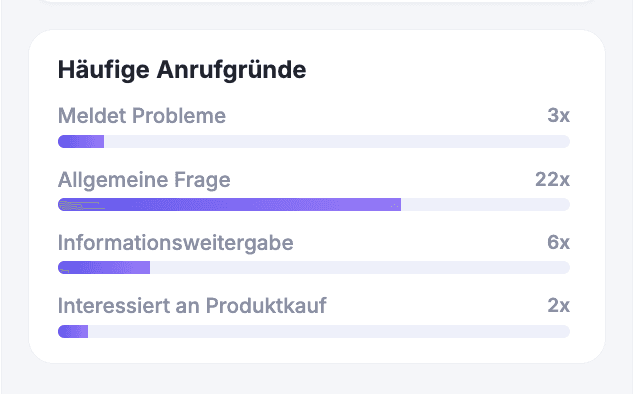
The widget shows the automatically detected call reasons as bars by frequency – for example, “General question 22×,” “Passing on information 6×,” “Reports a problem 3×,” “Interested in buying a product 2×.” The AI assigns the categories based on what was said in the call, with no upkeep required on your end.
From numbers to action
The value comes from acting on the top reasons:
| If this is at the top … | … here's what to do |
|---|---|
| General question | Expand the knowledge base – whatever's in it, the agent answers on its own |
| Reports a problem | Check/enable the complaint function – and get to the root cause in your business |
| Interested in buying a product | Define a dedicated “Purchase interest” request or set up call forwarding to sales |
| Unclear reason | Run a content search in the call list – the actual calls show what's behind it |
A real-world example
At a software company, “General question” leads by a wide margin. A content search in the call list shows that it's almost always about pricing. The price list goes into the knowledge base – two weeks later, the agent answers the question itself, and transfers to the team drop noticeably. One bar in the widget, one file, one measurable result.
Where: AI Telephony (“KI-Telefonie”) → Overview (“Übersicht”) → Frequent Call Reasons widget
Good to know
- It's the combination that counts: The widget tells you the what, the content search in the call list the why – together they're your analysis toolkit.
- A weekly check is enough. Call reasons change with the seasons, campaigns and problems – the widget is an early-warning system, not a real-time monitor.
- Every top reason is a to-do: What gets asked often belongs in the knowledge base; what gets reported often needs fixing; what people often want to buy should be routed to sales.
Last updated July 17, 2026
Related
- Your AI Telephony Dashboard at a GlanceKey metrics, call types, open entries and usage: how to read the AI Telephony Overview and know what happened in two minutes.
- Search & filter the call log – even by conversation contentForgot the number but remember the topic? The call log also searches conversation content. Plus: filters, date ranges and what the call tags mean.
- Fill your knowledge base: documents your agent answers fromUpload PDFs, Word and text files – your agent reads them automatically and answers questions about them. Multiple documents allowed, up to 10 MB per file.
