Set up your greeting – in up to six languages
The first message matters: add a greeting in up to 6 languages, and your agent automatically detects the caller's language. Including the AI disclosure.
In the app: AI Telephony → Agents → [Agent] → Greeting
The welcome message is the first thing callers hear – within seconds, it decides whether the conversation feels right. Keep it short, say in a friendly way who's speaking, and meet the AI disclosure requirement while you're at it. And since not every caller speaks German, you can add the greeting in six languages: the agent automatically detects the caller's language and picks the matching one.
How to set it up
- Open your agent and go to the Greeting (“Begrüßung”) tab.
- In the DE tab, write your German welcome message. A proven pattern (shown here in English): “Hello! This is [Name], the AI assistant for [Company]. This call is handled by an AI and recorded for quality purposes. How can I help you?”
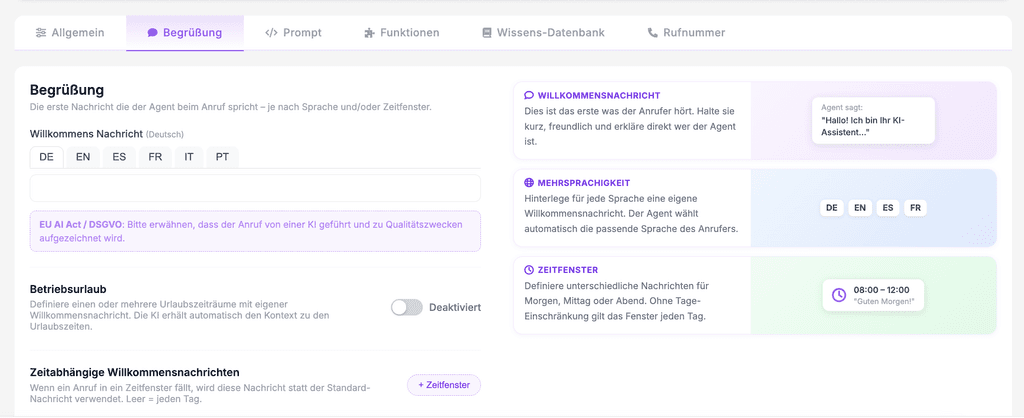
- Note the hint below the input field: under the EU AI Act / GDPR, the greeting should mention that the call is handled by an AI and recorded for quality purposes – include this in every language version.
- Switch through the language tabs EN, ES, FR, IT, PT and add a message for every language your callers use.
- Save (“Speichern”) – and make one test call.
Real-world example
A hotel in Tyrol maintains German, English and Italian. When a guest from Milan calls, they automatically hear the Italian greeting and have the entire conversation in Italian – no menu, no “For English, press 2.” For the team, that was the moment the agent went from tool to showpiece.
Where: AI Telephony (“KI-Telefonie”) → Agents (“Agenten”) → choose an agent → Greeting tab
Good to know
- Short wins: One or two sentences plus an open question. Everything the agent should know about your business doesn't belong in the greeting – it goes in the knowledge base and the prompt.
- The greeting only covers the first sentence – how the agent talks and behaves after that is controlled by the system prompt.
- Time windows beat the default: If a call falls within a time-based greeting window (e.g. “Good morning” until 09:30), that window's message replaces the default greeting.
- Groups in your address book can have their own greeting, too – for example, a personal salutation for regular customers. Remember the AI disclosure there as well.
- The same tab also has Business closure (“Betriebsurlaub”): vacation periods with their own message, whose context the AI receives automatically.
Last updated July 17, 2026
Related
- Time-based greetings for morning, midday and eveningGreet callers differently in the morning, at midday and in the evening: time windows with weekday settings automatically replace your default greeting.
- Personalized greetings with variables: “Hello {callerVorname}!”Greet known callers by name: how to use {callerVorname}, {callerName} and {callerGender} in a group's welcome text.
- EU AI Act & GDPR: The AI Disclosure in Your GreetingCallers need to know they're talking to an AI and that the call is recorded. How to word the disclosure – and every place it needs to go.
