Intro Music & Hold Music: What Callers Hear on the Line
Music before the conversation and music during a transfer are two settings in two different places – here's how to use both well.
In the app: AI Telephony → Agents → [Agent] → General
There are two moments when callers can hear music with Callana: before the AI agent picks up the conversation (intro music) and while it transfers the call to a person (hold music). Each is a separate setting in a different place – and both deserve a deliberate choice rather than the default.
Intro music: before the agent picks up
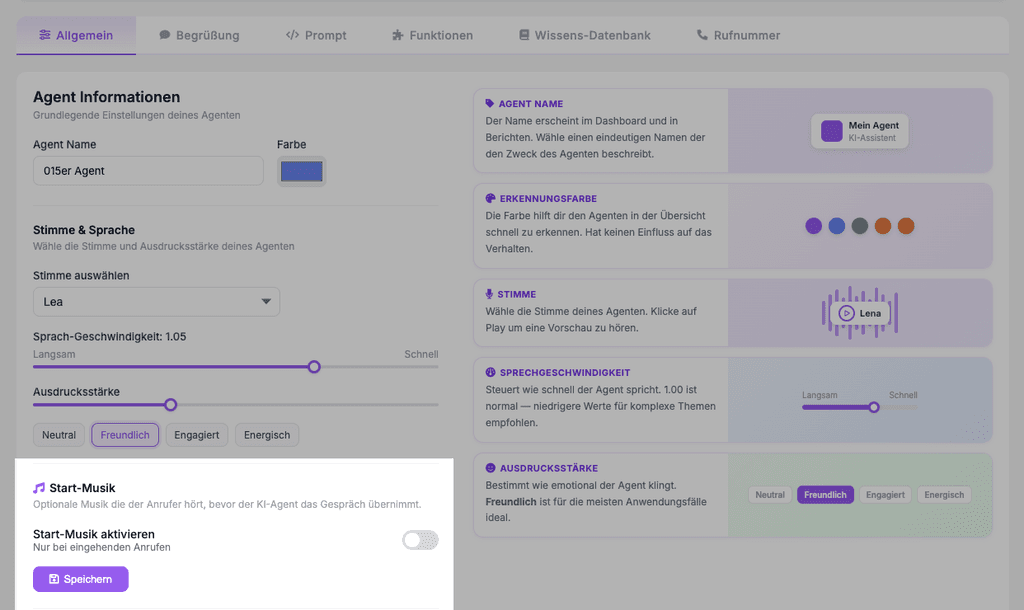
- Open your agent on the General tab (“Allgemein”) and scroll to the Intro Music section (“Start-Musik”) – optional music the caller hears before the AI agent picks up the conversation.
- Turn on the Enable intro music switch (“Start-Musik aktivieren”). It only applies to incoming calls.
- Save – and be sure to call in yourself once to hear the effect.
Hold music: during a transfer
- On the Overview (“Übersicht”), open the Functions card (“Funktionen”) → Call Forwarding (“Weiterleitungen”) and select the destination you want.
- On the General tab, you'll find the Hold music during transfer dropdown (“Wartemusik während Weiterleitung”), e.g., “Standard Wartemusik” – that's what the caller hears while the connection is being set up.
- Because hold music is chosen per forwarding destination, each destination can have its own.
A real-world example
A car dealership deliberately leaves intro music off – callers should hear the greeting right away, not a jingle first. When calls are transferred to the service manager, though, hold music is on: the handoff takes a few seconds, and silence on the line feels like a dropped call. It's the opposite of what most people would do by instinct – but on the phone, it's the better order.
Where: Intro music: AI Telephony (“KI-Telefonie”) → Agents (“Agenten”) → [Agent] → General tab · Hold music: Overview → Functions → Call Forwarding → destination → General tab
Good to know
- Every second before the greeting tests callers' patience. If you enable intro music, keep an eye on abandoned calls – if early hang-ups start piling up, the music is a prime suspect.
- Avoid silence during transfers: Hold music signals “we're still here” – especially for destinations that take a few seconds to pick up.
- Intro music is an agent setting; hold music is a destination setting. If you're looking for both, you'll find them in two places.
Last updated July 17, 2026
Related
- Set your agent's voice, speaking speed and expressivenessChoose a voice, then fine-tune speed and expressiveness so your agent sounds like your brand. With audio previews right in the dashboard.
- Transfer calls to the right person with schedules and alertsSet up multiple transfer destinations with plain-language rules, time windows and notifications – your agent automatically puts callers through to the right person.
- Abandoned Calls: Spot Missed Opportunities and Win Them BackSomeone who hangs up after 10 seconds still wanted something. How Callana detects abandoned calls – and how to turn them into callbacks.
