Personalized greetings with variables: “Hello {callerVorname}!”
Greet known callers by name: how to use {callerVorname}, {callerName} and {callerGender} in a group's welcome text.
In the app: AI Telephony → Contacts → Groups → [Group]
The difference between “Welcome to Company XY” and “Hi Maria, great to hear from you!” is the difference between a hotline and a front desk. For contacts in your address book, your agent can do exactly that: it recognizes the caller by their phone number and greets them with their group's welcome text – including their name.
How to set it up
- Open Contacts → Groups (“Kontakte → Gruppen”) and edit the group you want (or create a new one, e.g. “Regular customers”).
- Write the Welcome text (“Willkommenstext”) and insert the variables where the name should go. Available variables:
| Variable | Replaced with |
|---|---|
{callerVorname} | The contact's first name |
{callerName} | The contact's last name |
{callerGender} | The contact's form of address – for phrasing with Mr./Ms. |
- Example: “Hello {callerVorname}! This is Ana, the AI assistant for [Company] – this call is recorded for quality purposes. Are you calling about your next appointment?”
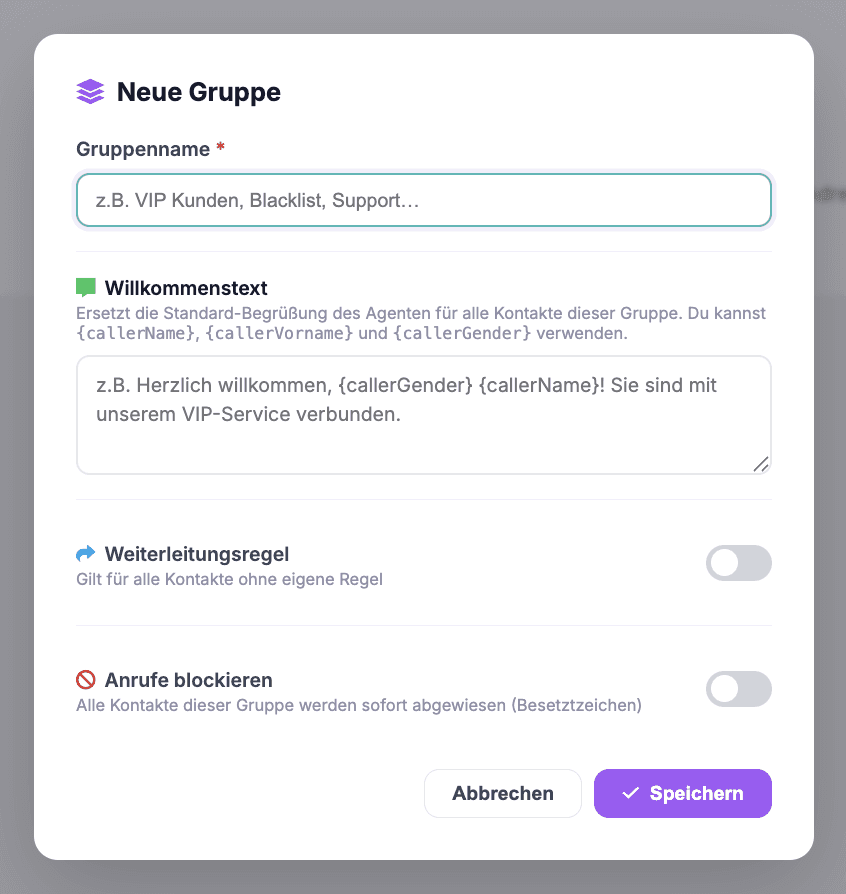
- Save (“Speichern”) – and assign the right contacts to the group. Important: recognition works via the phone number, so the contact needs a number on file.
Real-world example
A physical therapy practice creates a “Regular patients” group: “Hi {callerVorname}, thanks for calling! Is this about your next appointment, or is there something else I can help you with?” You can hear the difference on the phone – callers feel recognized rather than processed, and many get to the point faster.
Where: AI Telephony (“KI-Telefonie”) → Contacts → Groups → edit group
Good to know
- Clean contact data is half the battle: An empty first-name field leaves a blank in the sentence. Before you turn it on, check that first name and form of address are filled in for the group's contacts.
- The group welcome text completely replaces the default greeting – so the AI and recording notice (EU AI Act) belongs here, too.
- Want a personal greeting for a single contact? Just create a mini group with only that contact.
- Test it yourself: Add yourself as a contact with your cell phone number, assign yourself to the group and call – you'll hear the result in a minute.
Last updated July 17, 2026
Related
- Create & manage groups: rules for many contacts at onceGroups bundle contacts under shared rules: a custom greeting, transfer to a number or agent – or blocking.
- Set up your greeting – in up to six languagesThe first message matters: add a greeting in up to 6 languages, and your agent automatically detects the caller's language. Including the AI disclosure.
- Block callers: how to set up a blacklistSend unwanted numbers to a busy signal: create a blacklist group, turn on “Block calls”, assign contacts – done.
