Create & manage groups: rules for many contacts at once
Groups bundle contacts under shared rules: a custom greeting, transfer to a number or agent – or blocking.
In the app: AI Telephony → Contacts → Groups
Instead of setting up how each contact is greeted and handled one by one, you define it once per group: regular customers get a personal greeting, suppliers go straight to purchasing, nuisance callers hear a busy signal. New contacts inherit the rules as soon as you assign them to the group.
How to set it up
- Open Contacts (“Kontakte”) and click Groups (“Gruppen”) in the top-right corner.
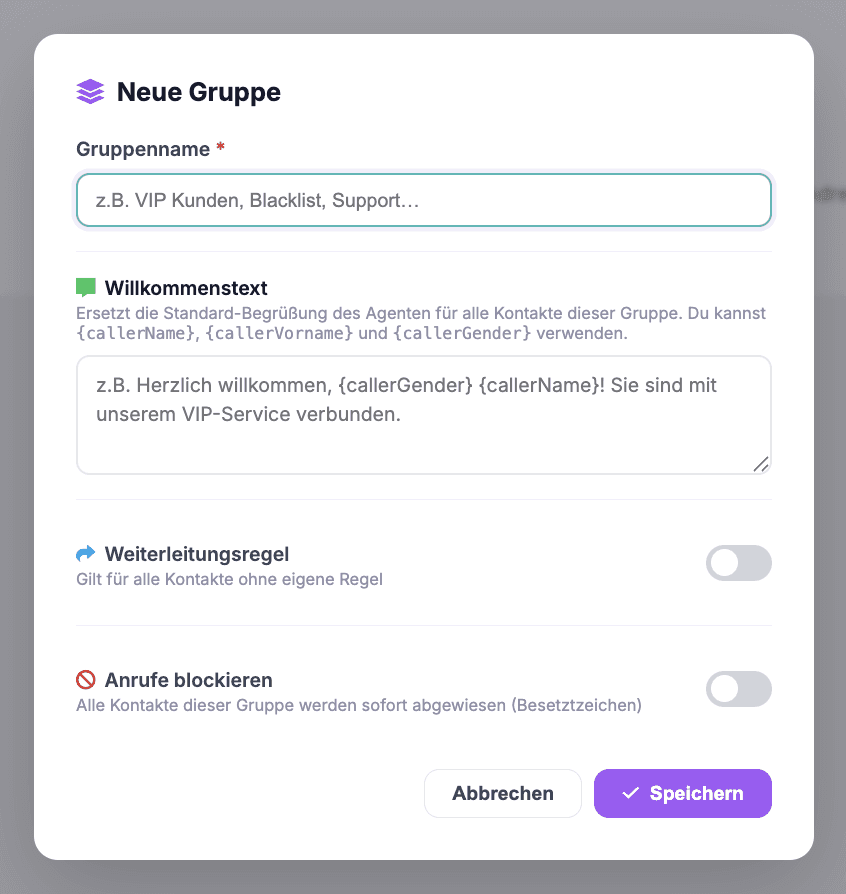
- Create a group with + New group (“+ Neue Gruppe”) and enter a Group name (“Gruppenname”, required). [Screenshot: group overview with group cards and status badges]
- Optional: Write a Welcome text (“Willkommenstext”) – it replaces the agent's default greeting for all contacts in this group. With the variables
{callerVorname},{callerName}and{callerGender}, the greeting becomes personal (there's a linked article on this). - Optional: Turn on a Forwarding rule (“Weiterleitungsregel”) and choose the type – Phone number (“Rufnummer”; the call goes to a fixed number) or Agent (a specific agent takes the call, selectable from a dropdown). The rule applies to all contacts in the group that don't have a rule of their own.
- Optional: Block calls (“Anrufe blockieren”) – all contacts in the group are rejected immediately (busy signal).
- Save (“Speichern”). Then assign contacts: in the contact list, simply choose the right group in the Group (“Gruppe”) field for each contact.
Real-world example
A retail business works with three groups: “Regular customers” (personal greeting with first name, plus transfer to the sales agent), “Suppliers” (transfer to the purchasing department's direct line) and “Blacklist” (blocked). Every new contact gets sorted into a group when it's created – and the rules apply from the next call.
Where: AI Telephony (“KI-Telefonie”) → Contacts → Groups button
Good to know
- Contact beats group: If a contact has its own forwarding rule, that rule wins – the group rule only applies to contacts “without their own rule”.
- The status badges on the group cards show at a glance what a group does: greeting text, assigned agent, “No forwarding rule” (“Keine Weiterleitungsregel”) or “Blocked” (“Blockiert”).
- A group can combine a greeting and a transfer – first the personal salutation, then the transfer.
- Group rules apply to agents that have the address book enabled (Agents → General tab).
- Using the icons on a group card, you can view, edit and delete groups.
Last updated July 17, 2026
Related
- Personalized greetings with variables: “Hello {callerVorname}!”Greet known callers by name: how to use {callerVorname}, {callerName} and {callerGender} in a group's welcome text.
- Block callers: how to set up a blacklistSend unwanted numbers to a busy signal: create a blacklist group, turn on “Block calls”, assign contacts – done.
- Add & Edit Contacts Right in the TableAdd and edit contacts right in the table: salutation, name, company, phone number, group and call forwarding – no extra forms to fill out.
