Record Complaints: Capture Feedback Instead of Losing It
Capture complaints in a structured way, not on the fly: the agent documents and categorizes them – and the dashboard shows how many there were.
In the app: AI Telephony → Agents → [Agent] → Functions
Complaints are unpleasant – and worth their weight in gold when they actually reach you. On the phone, they often get lost: the wrong person picks up, half of it gets written down, it's never passed on. With the Record Complaint function (“Beschwerde aufnehmen”), your agent documents complaints in a structured way and categorizes them – nothing slips through the cracks anymore.
How to set it up
- Open your agent on the Functions tab (“Funktionen”) and check Record Complaint.
- Decide where complaints should be reported: on the Overview (“Übersicht”) via the Functions card → Complaints (“Beschwerden”). The panel asks you exactly that question (“Where should complaints be reported?”).
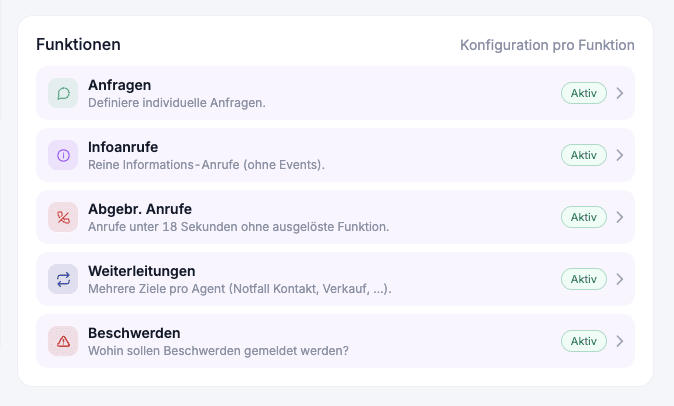
- File a test complaint: Call in and make a complaint as a test – you'll see how the agent responds and where the report ends up.
Where complaints show up
Complaints have a permanent spot on the Overview: as their own monthly metric in the header row and as a chip under Calls & Actions (“Anrufe & Aktionen”). So you can always see at a glance whether – and how often – someone has complained.
A real-world example
An online retailer sends complaints straight to its quality team. Since then, the monthly metric on the Overview has been the most honest number in the business: if it shows 0, that's no longer a gut feeling but something you can verify – and if it shows 4, the team knows the same day what it was about.
Where: AI Telephony (“KI-Telefonie”) → Agents (“Agenten”) → select an agent → Functions tab
Good to know
- How it differs from a request: A request captures a concern along with the information you've defined (callback request, appointment request). The complaint function is specialized: structured documentation with categorization – built for criticism.
- Categorization makes patterns visible: Three complaints about the same issue in one week aren't a coincidence – they're a to-do.
- You can steer the tone: How the agent responds to upset callers belongs in the system prompt – for example, “Stay calm, take the complaint seriously and record it completely, make no promises.”
Last updated July 17, 2026
Related
- Assign functions: decide what your agent can doSix functions, one checkbox each: decide per agent what it should handle – from requests and call transfers to address book transfers.
- Define custom requests: turn calls into structured emailsChoose which requests your agent captures, what details it asks for, and who gets them by email or SMS – including a confirmation text to the caller.
- Your AI Telephony Dashboard at a GlanceKey metrics, call types, open entries and usage: how to read the AI Telephony Overview and know what happened in two minutes.
