Free Minutes, Usage & Costs Explained
Free minute allowance, per-minute rates, call transfers and SMS: how to read the Plan & Usage panel and keep your costs under control.
In the app: AI Telephony → Overview → Plan & Usage
No surprises on your invoice: the Plan & Usage (“Tarif & Verbrauch”) panel on the Overview shows where you stand for the month at any time – how many free minutes are left, what individual services cost, and where your minutes went.
How to read the panel
Plan & additional costs: At the top you'll see your plan name and the “additional costs (month)” (“zusätzliche Kosten (Monat)”) – everything you've used this month beyond your included allowance. If it shows €0.00, you're within your free minutes.
The rate lines: Below that are the terms of your plan – the price per call minute, per SMS and per forwarding minute. These depend on your plan; the figures shown in the panel are the ones that apply.
Free minutes: The progress bar shows used/allowance (e.g., 32 / 1,000 min), next to it your available minutes and the reset date – the day your allowance starts over.
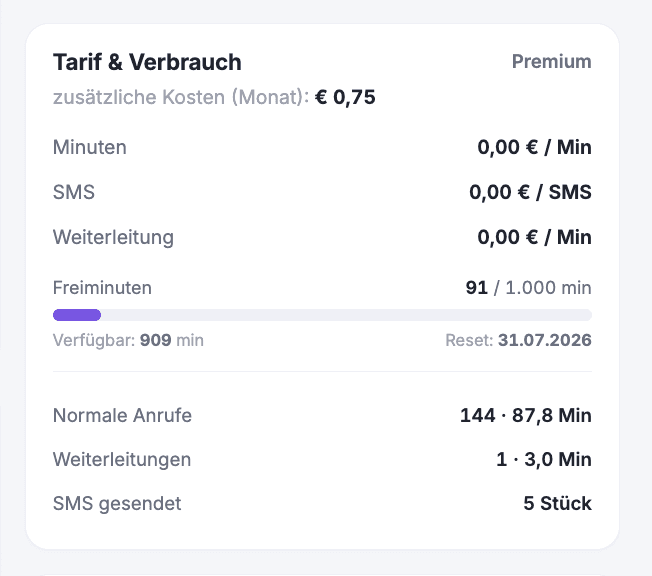
The breakdown: At the very bottom you can see where the time went – regular calls (count · minutes), call transfers (count · minutes) and SMS sent (count). Forwarding minutes are the time a call runs while it's transferred, and they're listed separately.
A real-world example
Halfway through the month, a business notices an unusually high number of forwarding minutes in the panel. A content search in the call list reveals why: callers are asking about delivery times and get transferred because the agent has no answer. After two paragraphs are added to the knowledge base, the agent answers the question itself – forwarding minutes drop, and the team gets interrupted less often.
Where: AI Telephony (“KI-Telefonie”) → Overview (“Übersicht”), right column → Plan & Usage
Good to know
- SMS messages cost extra – per message. Wherever you enable SMS options (confirmation texts to callers, SMS on errors, SMS notifications), Callana points this out in the settings window. Only turn on what's worth the price.
- Lots of transfers are a signal: Anything the agent can answer itself costs no forwarding minutes and no team time – the knowledge base and requests are the levers to pull.
- All figures refer to the current billing month and start over on the reset date.
- For questions about your plan or terms, contact the Callana team – you can always see the current terms of your contract right in the panel.
Last updated July 17, 2026
Related
- Your AI Telephony Dashboard at a GlanceKey metrics, call types, open entries and usage: how to read the AI Telephony Overview and know what happened in two minutes.
- Transfer calls to the right person with schedules and alertsSet up multiple transfer destinations with plain-language rules, time windows and notifications – your agent automatically puts callers through to the right person.
- Define custom requests: turn calls into structured emailsChoose which requests your agent captures, what details it asks for, and who gets them by email or SMS – including a confirmation text to the caller.
